Independent pool professional

Clients, quotes, contracts, planning, invoices and reports.

You have all the tools of the trade : quotes and deposit invoices, work orders and invoices, maintenance contracts, planning with timer, stock, equipment, reminders and receivables. The scenarios below walk you through the most common situations, step by step.
Your scenarios, based on your activity model

A new job: from quote to final invoice

A new job: from quote to final invoice

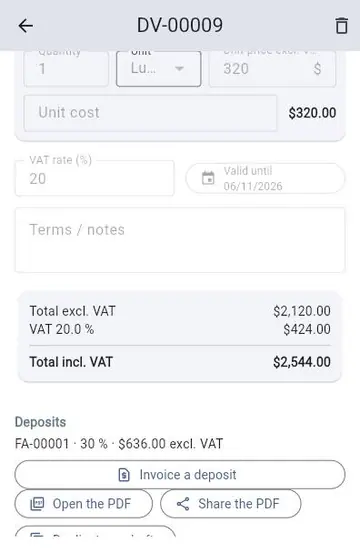
Menu ⋮ → Works to plan → Quotes tab: create the quote (lines, VAT, validity), "Issue the quote", then send the PDF to the client.

Guide & best practices →
Maintenance contract: automatic visits and invoices

Maintenance contract: automatic visits and invoices

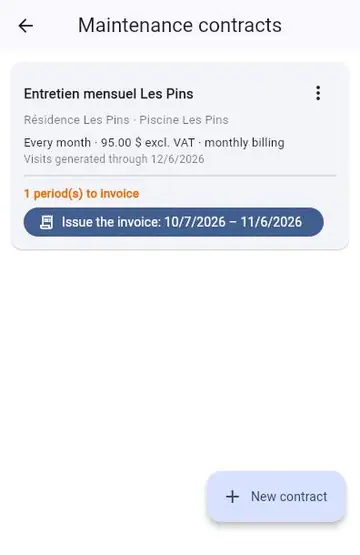
Menu ⋮ → Maintenance contracts → "New contract": choose the pool, the frequency of visits, the price and the billing period.

Guide & best practices →
Unpaid invoice: remind and follow up

Unpaid invoice: remind and follow up

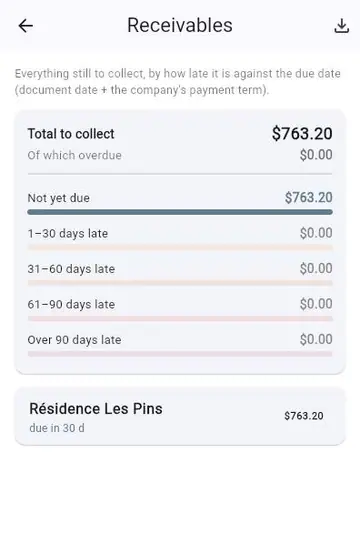
Menu ⋮ → Work orders / Invoices: the hourglass icon opens Receivables, sorted by lateness (1-30, 31-60, 61-90, over 90 days after the due date).

Guide & best practices →

Equipment at end of life: offer a quote

pool card (edit) → Equipment: add the pump, the filter... with installation date, warranty and lifespan.

Guide & best practices →
Your round of the day

Your round of the day

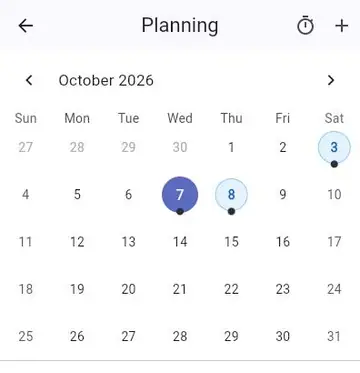
Planning: pick the day; each visit shows the client, the address and the technician.

Guide & best practices →

Profitability and accounting

Planning → timer icon "Time and margin": time spent per technician, per client and per contract, compared with what was invoiced.

Guide & best practices →

Inviting your team and sharing the work

Menu ⋮ → members: "Invite", enter the e-mail address and choose the role (Administrator, Editor or Reader).

Guide & best practices →

Forgetting nothing: reminders and "To do"

The "To do" card on the home screen gathers what needs action: late tests, payments, quotes, works, equipment to watch...

Guide & best practices →

Try CoachPool

Choose your profile: the demo opens with sample data matching your activity. Nothing is saved.