A sanitary log ready to print
Tests, products added and maintenance operations gathered in one dated document, with a review box to sign.
You look after the pools of a hotel, a campsite, an aquatic center or a holiday residence with a small technical team. There are no quotes or invoices here: CoachPool is designed for internal follow-up. Each establishment is a site and each pool has its own history of tests, treatments and maintenance. You know at any moment which one needs attention, and you find in seconds the records to show during an inspection.
Tests, products added and maintenance operations gathered in one dated document, with a review box to sign.
The dashboard ranks pools by water condition and by overdue maintenance.
Each job has a status, a priority, an estimate and photos, from the report to completion.
Technicians enter data on their phones; you choose who sees which sites and who can edit what.
Degraded water, low stock, overdue maintenance: a notification on the device and, if you wish, an e-mail.
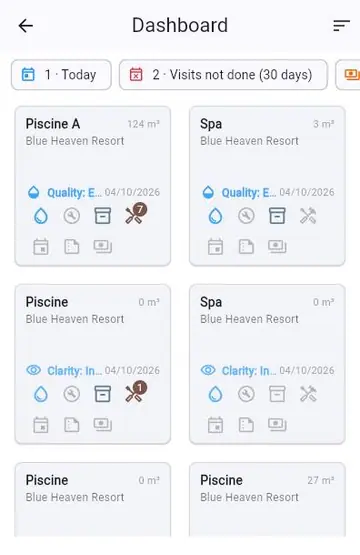
Home: each card shows the water quality, its temperature and the alerts; the "To do" card lists what is late (tests, maintenance, quality to watch).
Guide & best practices →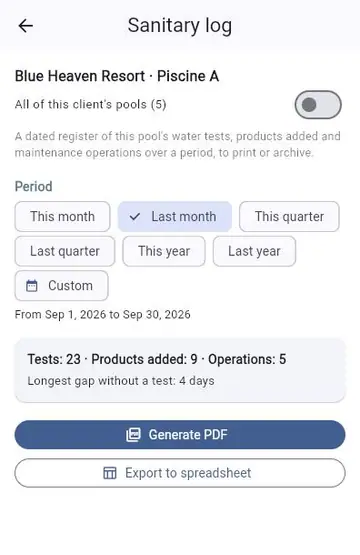
Water log of the pool → "Sanitary log" icon.
Guide & best practices →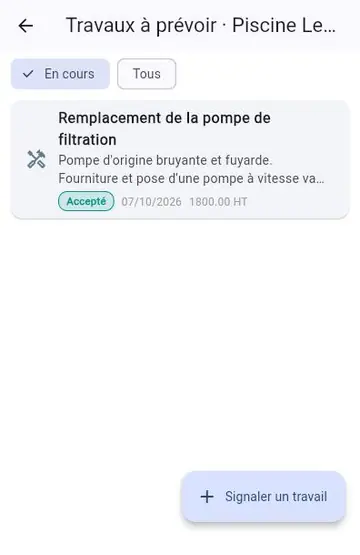
A operator reports a problem from the pool card: "Works to plan" (photos, urgency).
Guide & best practices →Menu PRO / ⋮ → members: "Invite", enter the e-mail address and choose the role (Administrator, Editor or Reader).
Guide & best practices →The "To do" card on the home screen gathers what needs action: late tests, payments, quotes, works, equipment to watch...
Guide & best practices →It gathers the readings you enter in a readable, printable format. Compliance depends on what you record and on the rules of your country: the document carries a note to that effect.
Yes. Each establishment is a site with its own pools, and the dashboard compares them on a single screen.
Yes. The viewer role lets people consult data without changing it; editors enter data and administrators manage.
Yes: spreadsheets and PDF for the sanitary log, and an export of all your data from the account settings.
The demo opens with sample data matching your activity. Nothing is saved.